HVAC accounting software: keep QuickBooks, or run the books inside your HVAC software
A small HVAC company has two real choices for its books. Keep QuickBooks and pick HVAC software that syncs to it: FieldEdge has the deepest two-way sync, QuickBooks Desktop included, and Housecall Pro, Jobber and Service Fusion sync too. Or run the books inside the HVAC software, so there is one customer list and nothing to sync: Trade Books does that on every tier from $49 a month, and Successware and Aptora do it for larger companies, priced by quote. ServiceTitan sits in between, with an accounting module that still posts to QuickBooks or Sage Intacct.
Trade Books is our product. It is in this list because it fits the question; where it doesn't fit, we say so.
Trade Books — a double-entry ledger on every tier: $49/mo for one user, $149/mo flat for up to 10.
Best if QuickBooks has to stay
FieldEdge — real-time, two-way sync with QuickBooks Online and Desktop; quote only.
Books inside the app, 10+ trucks
Successware or Aptora Total Office Manager — their own general ledgers; both quote only.
Cheapest QuickBooks pairing
Jobber Connect ($139/mo for one user) plus QuickBooks Online Essentials ($85/mo).
What an HVAC company's books need
HVAC accounting is mostly about tying money to jobs and agreements. Each service call, changeout and maintenance visit should carry its revenue, parts and labor so you can see which work made money; maintenance agreements bill on a schedule and the visits they promise have to land on the board; parts move from the supply house onto trucks and into jobs; and the busy season's cash has to carry the shoulder months. QuickBooks can hold all of that as numbers, but it does not know what a job, an agreement or a truck is. The HVAC software does, so the real question is where the ledger lives.
If the ledger stays in QuickBooks, every invoice, payment, refund and supply-house bill makes the trip through a sync, and someone keeps two customer lists matched every month. If the ledger lives in the HVAC software, the posting happens when the work happens. The screenshots below show what that looks like in Trade Books.
What built-in HVAC accounting looks like
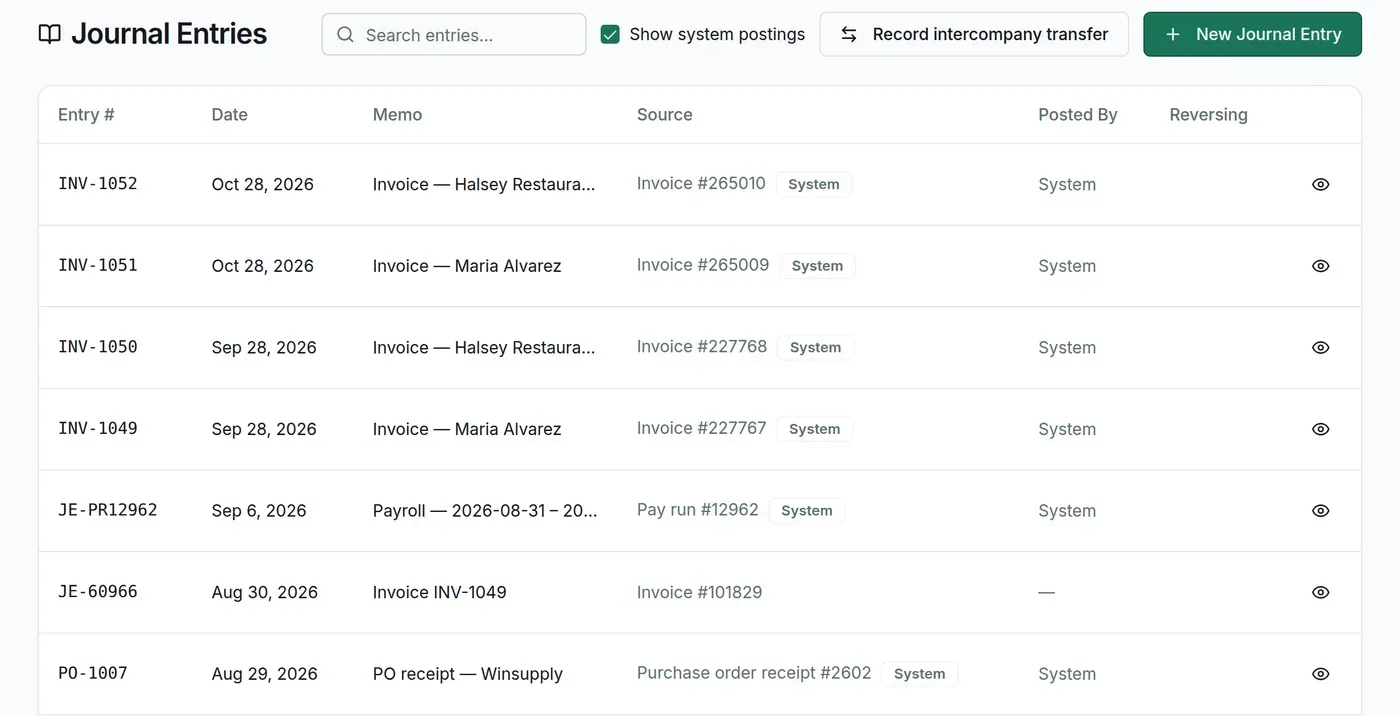
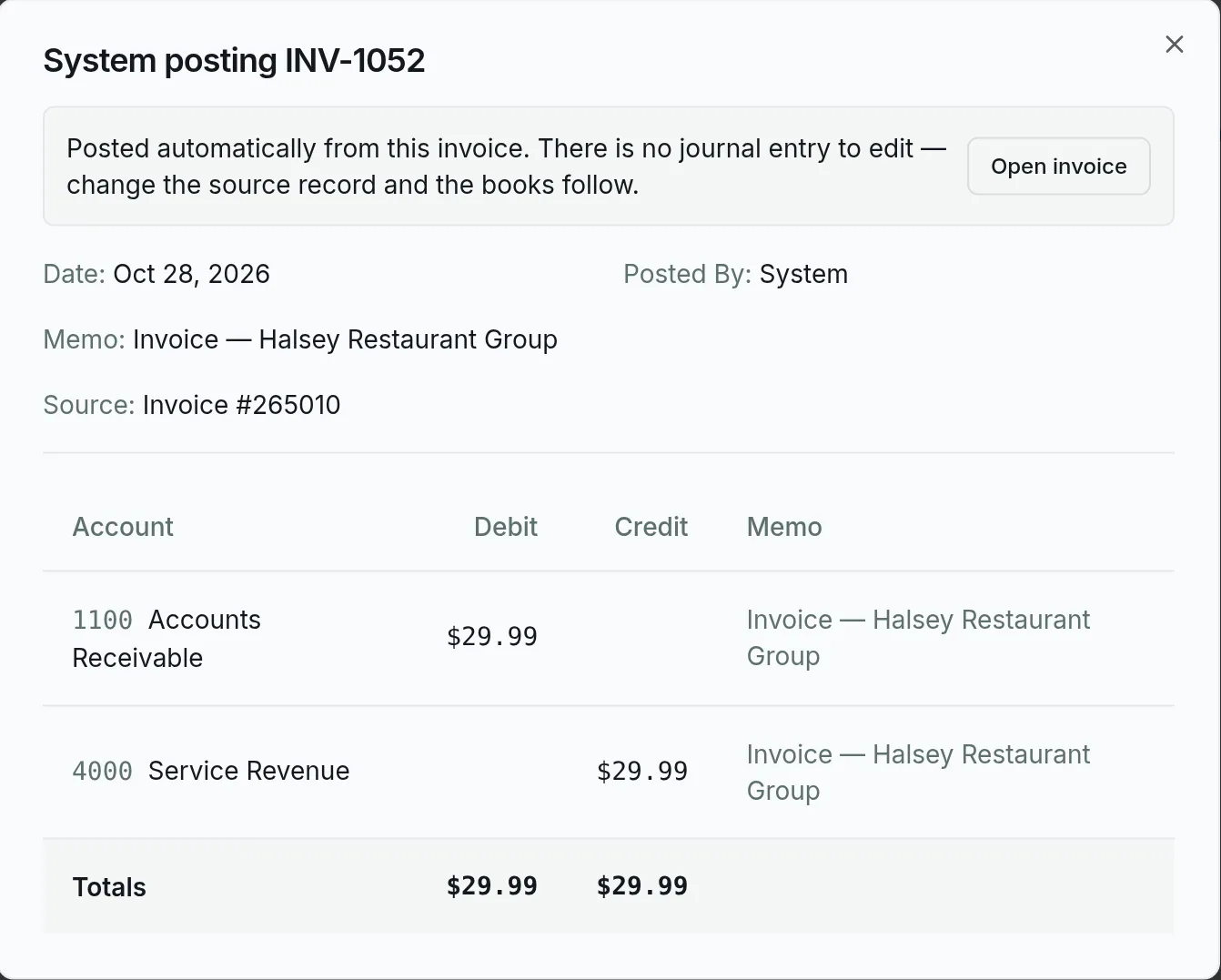
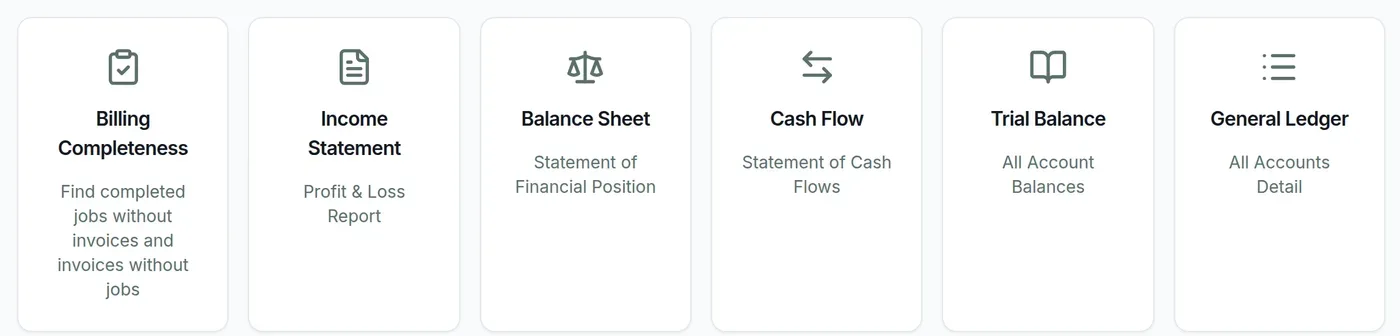
Captured from the Trade Books app in November 2026 on our demo HVAC company — real screens, demo data.
Every invoice, payroll run and purchase-order receipt posts its own journal entry when it happens — no nightly sync and no export step. The same Accounting area holds the rest of the books: chart of accounts, recurring entries, fixed assets, loans, sales tax, bank register, deposits, reconciliation, budgets and a QuickBooks export for your CPA.Open any posting to see the debits and credits behind it. A system posting can't be edited on its own — fix the invoice and the books follow, which is what keeps the ledger and the job records from drifting apart.The reports a CPA asks for — income statement, balance sheet, cash flow, trial balance, general ledger detail, A/R and A/P aging, sales tax — plus Billing Completeness, which finds finished jobs that never got an invoice.
Side by side
Published prices read off each vendor's pricing page between September and November 2026. Vendors that sell by quote get a description, not a guess.
The enterprise platform: call center, marketing attribution, pricebook pro — priced and implemented like enterprise software.
Quote only
Quote only. Reported $245–$500 per tech per month, $5,000–$15,000 implementation for a small shop, 12-month contract
Module + outside ledger
Accounting module batches invoices and payments and maps GL accounts, then posts to QuickBooks or Sage Intacct — the ledger stays in the accounting package
Export only
Payroll module tracks hours, commissions and performance pay, then exports to your payroll provider
Shops past ten trucks with a call center, a marketing budget and an implementation budget
The enterprise platform: call center, marketing attribution, pricebook pro — priced and implemented like enterprise software.
Published price
Quote only
Quote only. Reported $245–$500 per tech per month, $5,000–$15,000 implementation for a small shop, 12-month contract
Accounting
Module + outside ledger
Accounting module batches invoices and payments and maps GL accounts, then posts to QuickBooks or Sage Intacct — the ledger stays in the accounting package
Payroll
Export only
Payroll module tracks hours, commissions and performance pay, then exports to your payroll provider
Best for
Shops past ten trucks with a call center, a marketing budget and an implementation budget
Flat monthly price with unlimited users; QuickBooks for the books, Gusto for payroll.
Published price
Starter $225 · Plus $350 · Pro $575 per month, unlimited users (15% off if you prepay the year)
Accounting
Sync to accounting software
QuickBooks integration on every plan — no ledger of its own
Payroll
None
None built in — Gusto partnership
Best for
Crews of 8–30 that want one flat bill for the office software and already run QuickBooks
1. Trade Books
Ours
The general ledger in the same app as dispatch
$49/mo for 1 user · $149/mo flat for up to 10 users · $299/mo flat for up to 50
For an HVAC shop under about ten trucks that wants to stop running two systems, Trade Books puts the general ledger in the same app as the dispatch board. An invoice, a payment, a supply-house bill, a purchase-order receipt and a payroll run each post their own double-entry journal entry; the chart of accounts, P&L, balance sheet, cash flow, A/R and A/P aging, bank reconciliation, sales tax and month-end close are all inside, and maintenance-agreement dues bill as invoices on the same ledger. Starter is $49/mo for one user with the full accounting; Professional is $149/mo flat for up to 10 users and adds job costing and payroll.
Where it's strong
Ledger, dispatch and agreements share one customer list
Invoices and supply-house bills post as they happen — nothing to sync
Job costing and payroll on Professional, posted to the same books
Watch for
No two-way QuickBooks sync — it replaces QuickBooks; CSV exports of customers and journal entries cover a CPA who wants a QuickBooks copy
Payroll calculates, pays and posts; the tax filings are still yours or your CPA's
If your bookkeeper will not leave QuickBooks, FieldEdge is the strongest HVAC answer: it was built around a real-time, two-way sync with both QuickBooks Online and QuickBooks Desktop, with HVAC and plumbing dispatch on top. You keep paying for QuickBooks and the ledger stays there, and FieldEdge itself is priced by quote.
Where it's strong
Two-way QuickBooks sync, Desktop included
Built for HVAC and plumbing service
Your bookkeeper keeps their QuickBooks file
Watch for
QuickBooks stays a second subscription
Quote-only pricing
Two systems to keep in step every month
3. Successware
Its own ledger, for 10–50 truck HVAC companies
Quote only
Successware is HVAC-first software for companies running roughly 10 to 50 trucks, with its own general ledger, A/R, A/P and job costing inside, so the books and the agreements live together. Payroll posts gross earnings to that ledger, but net pay and tax filing go through a payroll provider; pricing is by quote and it expects an office manager to run the books.
Where it's strong
Own general ledger with job costing
Agreements and dispatch built for HVAC
Long track record in the trade
Watch for
Quote-only, mid-size focus
Net pay needs a payroll provider
More system than a five-person shop needs
4. Aptora Total Office Manager
The heaviest accounting system on the list
Quote only
Aptora Total Office Manager is a contractor ERP with a general ledger, A/P, A/R, bank reconciliation, financial statements, inventory and full payroll (certified payroll included) next to dispatch. It runs as a Windows application, on-premises or hosted, and is priced by quote — a fit for a larger HVAC company replacing QuickBooks with an office team to run it.
Where it's strong
Accounting and full payroll together
Deep inventory and job costing
Certified payroll for commercial work
Watch for
Windows / hosted rather than a web app
Quote only, with a long setup
Heavy below ten trucks
5. ServiceTitan
A strong accounting module, but the ledger is elsewhere
Quote only. Reported $245–$500 per tech per month, $5,000–$15,000 implementation for a small shop, 12-month contract
ServiceTitan is the default name in residential HVAC, and its accounting module is genuinely useful to an accounting team: invoice and payment batching, GL account mapping, A/P and inventory valuation. The general ledger and financial statements still live in QuickBooks or Sage Intacct after export, so a small HVAC company does not get to drop its accounting package. Pricing is by quote, reported at $245–$500 per tech per month plus $5,000–$15,000 of implementation on a 12-month contract.
QuickBooks Online or Desktop, plus a bookkeeping service
Basic $79 (1 user) · Essentials $189 (5 users) · MAX $329 (8 users, +$35 each after)
Housecall Pro is a common pick for residential HVAC companies that sell maintenance plans and online booking, and it syncs to QuickBooks Online and Desktop. Its “Accounting” add-on is a bookkeeping service that maintains your QuickBooks file, not a ledger in the app, so QuickBooks stays a separate subscription; plans run $79 a month for one user, $189 for 5 and $329 for 8 ($35 a seat after that).
Where it's strong
QuickBooks Online and Desktop sync
Bookkeeping service for hands-off books
Easy for homeowners to book
Watch for
QuickBooks still required
Payroll and bookkeeping are add-ons priced by quote
The cheapest way to pair HVAC jobs with QuickBooks Online
Core $49 (1 user) · Connect $139 for 1 / $199 for 5 · Grow $199 for 1 / $299 for 5 · Plus $499 for 5; extra users $29 each
Jobber suits small HVAC service companies doing mostly residential repair and maintenance, and it syncs with QuickBooks Online from its Connect plan ($139 a month for one user). There is no QuickBooks Desktop support and no ledger in Jobber, so add QuickBooks Online Essentials at $85 a month to get a balance sheet and bank reconciliation.
Starter $225 · Plus $350 · Pro $575 per month, unlimited users (15% off if you prepay the year)
Service Fusion suits an HVAC company with a bigger crew that wants a predictable software bill — a flat $225, $350 or $575 a month with unlimited users — and a QuickBooks integration on every plan. It keeps no ledger of its own and runs no payroll, so the stack is Service Fusion for jobs, QuickBooks for the books and Gusto or another provider for pay.
Where it's strong
QuickBooks integration on every plan
Unlimited users at a flat price
Broad operations features
Watch for
No ledger of its own
No payroll
Higher entry price than small-shop apps
How to choose
1
Decide where the ledger lives first
Everything else follows from one choice: QuickBooks stays the system of record, or the HVAC software does. If your bookkeeper insists on QuickBooks Desktop, the list narrows to FieldEdge and Housecall Pro. If you want one customer list and nothing to sync, it narrows to Trade Books, Successware and Aptora.
2
Test the messy transactions in the trial
Run a refund, a partial payment, a deposit on a changeout and a supply-house bill through each candidate, then look at where they land in the books. Any sync handles the clean invoice; the messy ones show whether you will be fixing the books every month.
3
Price the whole stack, not the app
HVAC software that needs QuickBooks needs QuickBooks Online on top (Essentials is $85/mo for 3 users), and payroll is another bill if the app does not run it — Gusto Simple is $49 + $6 per person ($79 for five).
Questions contractors ask
What is the best accounting software for a small HVAC company?
If you want the books inside the HVAC software, Trade Books runs a double-entry ledger on every tier from $49/mo. If QuickBooks has to stay, FieldEdge has the deepest two-way QuickBooks sync for HVAC, Desktop included. Successware and Aptora run their own ledgers for companies past ten trucks, priced by quote.
Does HVAC software work with QuickBooks?
Most of it does. FieldEdge and Housecall Pro sync with QuickBooks Online and Desktop; Jobber syncs to QuickBooks Online from Connect; Service Fusion integrates on every plan; ServiceTitan posts to QuickBooks or Sage Intacct. Trade Books replaces QuickBooks instead of syncing, and exports customers and journal entries as CSV for a QuickBooks import.
Can an HVAC company stop using QuickBooks?
Yes, if the HVAC software has a chart of accounts, double-entry postings, financial statements, bank reconciliation, sales tax and a period close. Trade Books, Successware and Aptora do. Keep an export of your QuickBooks history for prior years and give your CPA a login before you cancel.
How do maintenance agreements show up in the books?
With a sync, the agreement lives in the HVAC app and its invoices are copied into QuickBooks. In Trade Books the agreement's dues invoices post to the same ledger as every other invoice, and the visits it promises are booked as jobs, so agreement revenue and the cost of the visits sit in one set of numbers.
What does HVAC accounting software cost?
Trade Books is $49/mo for one user and $149/mo flat for up to 10, accounting included. FieldEdge, Successware, Aptora and ServiceTitan are quote only. Jobber, Housecall Pro and Service Fusion need QuickBooks on top — $85/mo for QuickBooks Online Essentials.
Published prices read off each vendor's pricing page between September and November 2026; list prices, month to month, before taxes and payment-processing fees. Vendor names are their owners' trademarks. Trade Books is our product. It is in this list because it fits the question; where it doesn't fit, we say so.
Spotted a price that moved? Email [email protected] and we'll re-check it.
Close one month of HVAC books in the trial
Start the 30-day trial, run a week of service calls and supply-house bills through it, reconcile the bank, and hand your CPA the balance sheet.